前言
前段时间公司线上服务器中病毒崩溃了,重新搞好后,公司领导要求对项目的数据库连接加密,避免数据泄露,于是就研究了下jasypt。
依赖
        <dependency>
            <groupId>com.github.ulisesbocchio</groupId>
            <artifactId>jasypt-spring-boot-starter</artifactId>
            <version>3.0.2</version>
        </dependency>
加密
写个main进行加密,如下:
public static void main(String[] args) {
        //PBEWithHMACSHA512AndAES_256 算法(3.0.0开始的默认算法)
        AES256TextEncryptor encryptor = new AES256TextEncryptor();

        //PBEWithMD5AndDES 算法(旧版本的默认算法)
        //BasicTextEncryptor  encryptor = new BasicTextEncryptor();

        //PBEWithMD5AndTripleDES 算法
        //StrongTextEncryptor encryptor = new StrongTextEncryptor();

        //秘钥
        encryptor.setPassword("秘钥");
        //加密得到密文
        encryptor.encrypt("明文");
        //解密得到明文
        encryptor.decrypt("密文");
}
例如加密数据库连接
System.out.println(encryptor.encrypt("jdbc:mysql://127.0.0.1:3306/xxx?useUnicode=true&characterEncoding=utf-8&allowMultiQueries=true&serverTimezone=GMT%2B8"));
将这个输出的字符串按ENC(密文)替换配置文件里的数据库连接,如:
spring:
  datasource:
    druid:
      url: ENC(+Ur250W+H0rWe5fZQNo4/ZoMSPkMz4LpVy2ZmO0f5MH+IRwMSNN+UTo2eKuNmYrONnth6Ux8fSSSHB4VVsMhPyFVxuOOorluE2MfTKRBySZsYlE5wOCYO0IyNs6p5u1riENJGJgiB/s8YlCG5VwsZ95myveybGn2ZhcgddZMTLeXTczQq+nENLPLFtCG2HBvghN4YRXX3LUL3+CoE2EMRA==)
即可完成加密
解密
配置文件加密成功后启动项目肯定是要解密的,这个时候就需要秘钥进行解密,秘钥的配置有以下几种方式:
1 直接写在配置文件(不推荐)
jasypt:
encryptor:
  algorithm: PBEWithHMACSHA512AndAES_256  #使用的算法 对应刚才的main的注释算法
  iv-generator-classname: org.jasypt.iv.RandomIvGenerator  # 除了PBEWithHMACSHA512AndAES_256算法外,其他两个都写org.jasypt.iv.NoIvGenerator
  password: 123456  #秘钥
2 写在代码中 在springboot启动类的main函数中加
  public static void main(String[] args){
      System.setProperty("jasypt.encryptor.password", "123456");
      System.setProperty("jasypt.encryptor.algorithm", "PBEWithHMACSHA512AndAES_256");
      System.setProperty("jasypt.encryptor.iv-generator-classname", "org.jasypt.iv.RandomIvGenerator");
      SpringApplication.run(DemoApplication.class, args);
  }
3 启动时写入
如:java -jar -Djasypt.encryptor.password=秘钥 xxx.jar
- 4 设置在环境变量中
例如在环境变量中设置秘钥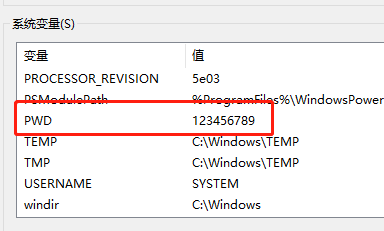
yml中使用:
jasypt:
  encryptor:
    password: ${PWD}
或java代码中使用
    public static void main(String[] args){
        System.setProperty("jasypt.encryptor.password", System.getenv("PWD"));
        SpringApplication.run(DemoApplication.class, args);
    }
PS:spring用法可以参考:https://blog.csdn.net/qq_28675967/article/details/90670994 和 https://blog.51cto.com/aiilive/1420903